 Biombo
Bitcoin Desk Ticker: Turn Your iPhone Duo Into a Display
Updated
You can put a live Bitcoin price ticker on your desk without buying extra hardware. Stand an iPhone Duo up like a tent, open Biombo, and the cover display becomes a crypto ticker that cycles through your watchlist in large type. It's a different trade-off from a dedicated ticker display, and both make sense for different people.
What makes a good desk ticker
A desk ticker is something you read from a meter away, between other things. That asks for:
- large numbers you can read without leaning in;
- the 24-hour change in a color you catch out of the corner of your eye;
- more than one coin, rotating on its own;
- a screen that stays on without someone touching it, and doesn't get the same image burned in over hours.
Option 1: a dedicated ticker display
Small single-purpose displays for crypto prices exist in many shapes, from LED strips to little desktop screens. Their strengths are real: they're always on, they don't use your phone, and once set up you never think about them.
The downsides are worth knowing before you buy one. It's another device to power and connect to Wi-Fi, setup usually happens through a separate app or a web page, some show a fixed set of coins or just the price, and when you want to look closer at a move you still reach for your phone.
Option 2: iPhone Duo in tent mode
iPhone Duo can stand on its own edges, partly open, like an upside-down V. In that posture the cover display faces you. Biombo detects the posture and switches to a ticker layout made for it:
- one coin at a time, with the price in large type;
- the 24-hour change, the day's high and low, and the volume;
- a candlestick chart next to the numbers;
- the next coins in your watchlist listed under the price, so you see more than one at a time.
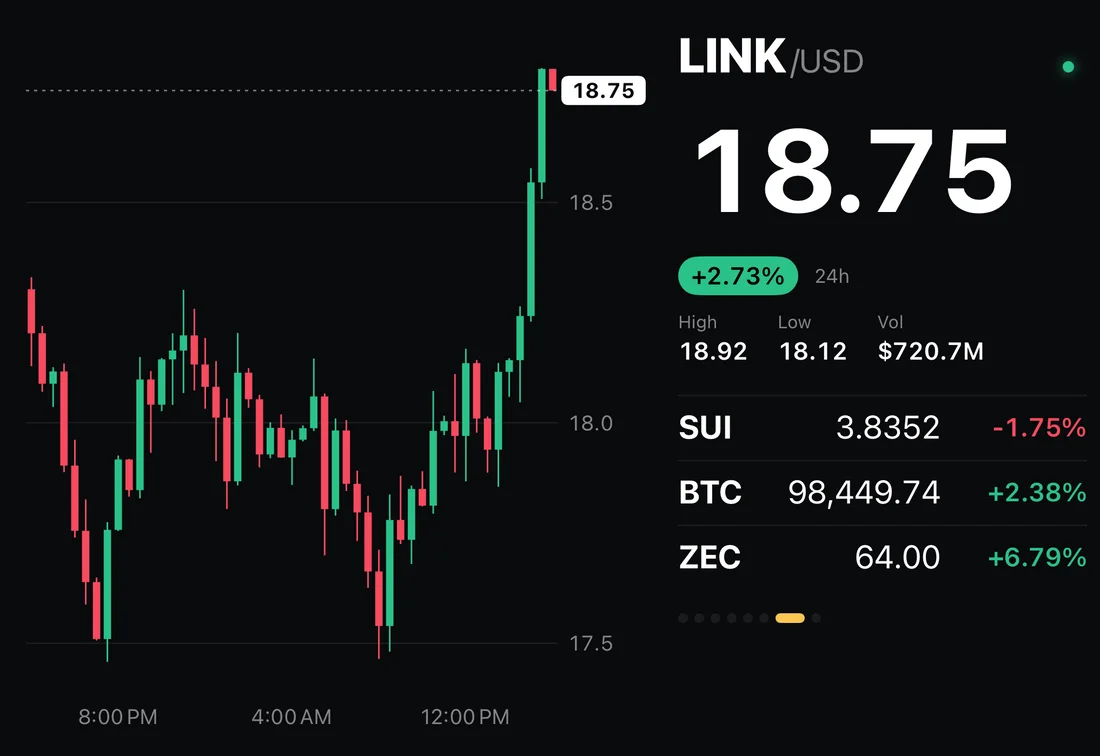
The ticker moves to the next coin on its own, every 6, 12, 30 or 60 seconds (you pick in Settings). Tap a coin in the list and it comes up right away.
Looking after the screen
A phone screen isn't meant to show the same thing for hours, so tent mode takes care of a few things on its own:
- it keeps the screen awake while the phone stands as a tent;
- every few minutes it shifts the content by a couple of points, so no pixel holds the same image for long;
- after 15 minutes without a touch it dims;
- on battery, it lets the phone go to sleep after two hours. Plugged in, it keeps going.
For an all-day ticker, stand the phone near a charger and plug it in.
How to set it up
- Add the coins you care about to your watchlist in Biombo. The order of the watchlist is the order of the ticker.
- Pick how long each coin stays up in Settings, under Tent.
- Open Biombo, unfold the phone partway and stand it on its edges, cover display facing you.
- Give it a second. Biombo waits briefly before switching, because the hinge passes through the same angles whenever you open or close the phone.
Which one should you choose?
If you want a ticker that's always there, never runs on your phone and never needs a charger nearby, a dedicated display is the simpler choice. If you already have an iPhone Duo, tent mode gives you a ticker with charts, your own watchlist and the rest of the app one unfold away, with nothing else to buy or set up. More on the posture itself in iPhone Duo postures explained.
FAQ
Can iPhone Duo work as a crypto ticker display?
Yes. In tent mode the cover display faces you, and an app like Biombo turns it into a ticker that rotates through your watchlist.
Does the screen stay on in tent mode?
In Biombo, yes. It keeps the screen awake, dims after 15 minutes without a touch, and on battery lets the phone sleep after two hours. Plugged in, it stays on.
Can I show only Bitcoin?
Yes. The ticker follows your watchlist, so a watchlist with only Bitcoin shows only Bitcoin.
Does the tent ticker work on other iPhones?
No. Tent mode needs the hinge of iPhone Duo. On other iPhones and iPad, Biombo shows the watchlist and the charts instead. See tracking crypto prices on iPhone Duo for everything else it does.
Does it send price alerts?
Not in version 1.0. Biombo shows prices while it's open; it doesn't send notifications.
If you have an iPhone Duo on your desk, you can get Biombo on the App Store and try the ticker.